
Supports SIG Mesh, but Cannot Join Mi Home? Xiaomi Mesh Product Identity and Integration Boundaries
Why SIG Mesh support does not guarantee Mi Home integration: product identity, MIoT mapping, template versions, asynchronous gateway replies and state caching.
A light can already join a SIG Mesh network, and a development board can control its power and brightness. To add it to Mi Home, is changing its advertising name and connecting a Xiaomi gateway enough?
The reverse question is equally common: if a Mi Home Bluetooth Mesh light uses a standard underneath, can a custom gateway take it over and bridge it to Matter?
Neither question can be answered by the label “supports SIG Mesh.”
The previous article covered provisioning, application keys and model binding. This article moves up a layer: how a device becomes a product Mi Home recognizes, how platform functions become wireless messages, and what a gateway actually promises.
This discussion follows Xiaomi BLE Mesh documentation accessible on November 5, 2026. Product generations, SDKs and gateway firmware must be checked separately; this is not a universal capability list for everything marketed as Xiaomi Mesh. The lights and diagnostic steps are design examples, not interoperability test results.
A light must answer three kinds of questions
Standard Mesh development deals with node addresses, keys, elements and models. Mi Home additionally needs to know what the product is, which functions it offers and how users operate it.
| Layer | Questions to answer | What is insufficient |
|---|---|---|
| Mesh network and application | How does it join, which models accept messages, and how are keys configured? | Detecting an advertisement |
| Product definition and identity | Which product and individual device is this, and can it complete platform binding? | Implementing a light-control model |
| Platform operation and maintenance | Can the app, voice assistant and gateway understand its functions, state and updates? | Completing one binding operation |
These layers are related but not interchangeable. Article three covered the transition from joining a network to being configured for application communication. Mi Home integration must also fit those capabilities into a supported product workflow.
When a chip supplier says “supports SIG Mesh,” the next questions should be: which integration scheme, which SDK version, and does it support our intended product category?
MIoT Spec and Mesh Model describe different interfaces
Xiaomi’s historical integration guide distinguishes MIoT Spec from Mesh Spec. The former describes product services, properties and operations; the latter concerns SIG Mesh models, messages and states. The current BLE Mesh basics still describe the gateway translating between Spec and Mesh messages.
Turning on a light might be represented at the platform as setting its power property to on. On the wireless side, that must become a message the target device can process. Reported state must be translated in the opposite direction.
This involves more than renaming fields. Platform and firmware must agree on function identifiers, data types, ranges and reporting behavior. A working brightness slider in the app does not prove its values are correctly mapped to the lighting model.
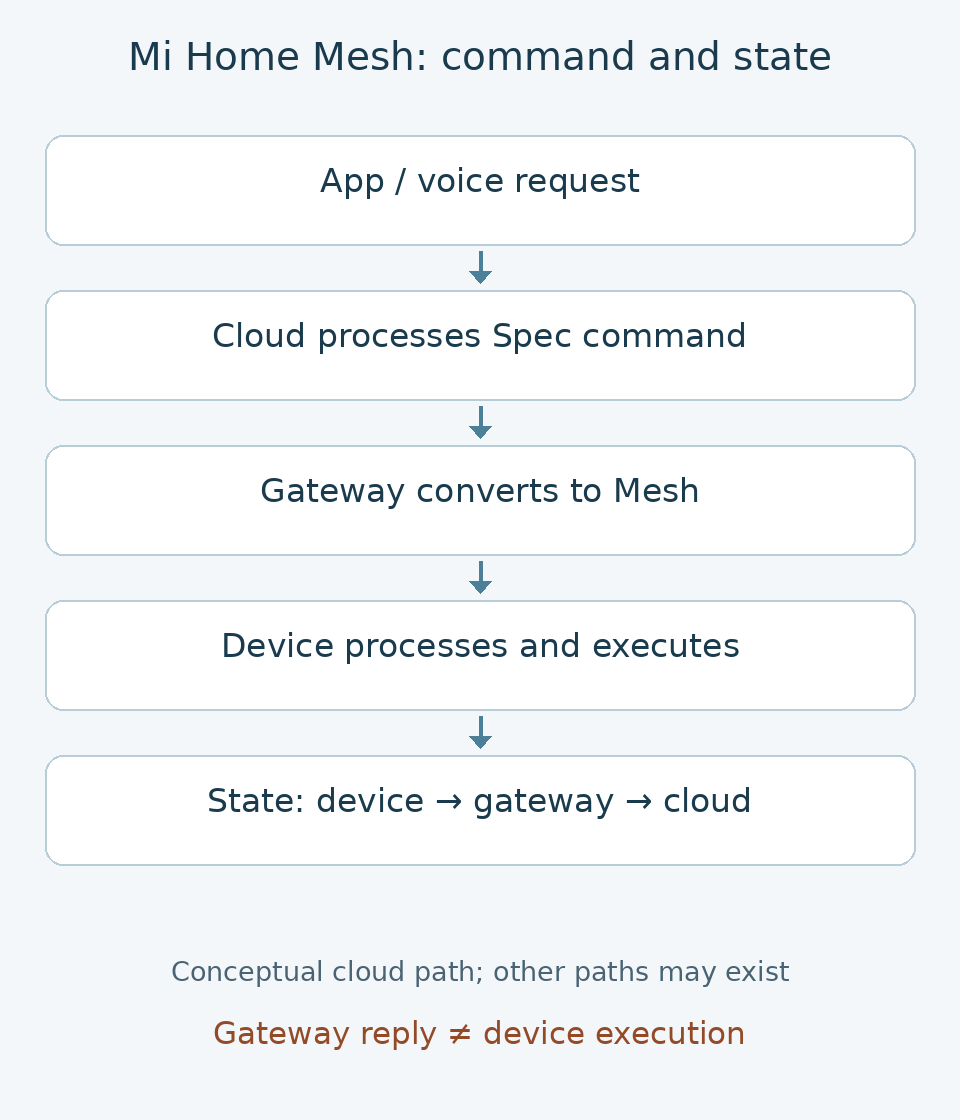
The diagram summarizes the cloud control path described by Xiaomi and omits network details such as relaying. It does not say all control must use the cloud; phone connections and product-specific local automation require separate examination.
Standard models and vendor extensions can coexist. The historical color-temperature light example includes both standard lighting models and Xiaomi models. It illustrates the architecture, but does not guarantee that today’s devices have the same element layout or model identifiers.
Adding a custom platform function likewise does not automatically teach existing gateways, firmware or voice interfaces how to use it. Each part’s support must be checked against the current scheme.
Product model, device identity and Mesh keys are different
Two meanings of “model” are easy to confuse. A platform product model name identifies a product type; a Mesh Model defines application communication behavior. Putting “light” in the product name does not implement a lighting model in firmware.
PID, or Product ID, is not an individual device’s Mesh unicast address either. Product identification and addressing within a network have different purposes.
Platform integration also has identity requirements. Xiaomi’s BLE Mesh FAQ states that, for its documented module scheme, the certificate chain, Product ID and MAC become associated after first binding. Changing that information can cause subsequent provisioning failures; a full-chip erase can remove the certificate chain.
A development module therefore should not be treated as an empty demo board that can always be erased and assigned another PID. Before flashing, confirm where identity data resides and which update, reset and recovery procedures the supplier supports.
This comes from Xiaomi’s particular module scheme, not a SIG Mesh requirement for every device. It does not establish a common flash layout for every chip or one recovery procedure for every product.
The previous article’s NetKey, AppKey and DevKey protect Mesh network, application and configuration communication. They do not replace product identity requirements, and a product certificate is not a Mesh application key.
A working standard Mesh demonstration proves that technical path works. Turning it into your own Mi Home product still requires the corresponding platform and identity configuration.
A real documentation difference: old templates cannot simply be copied
The most useful discovery in this research was a difference between newer and older documentation, rather than a code snippet.
Xiaomi’s BLE Mesh basics page is dated August 4, 2026. It announces template changes from August 6 for newly created BLE Mesh products, excluding test products already created. Brightness-light and brightness/color-temperature-light templates remain unchanged. Templates for one-, two- and three-key switches and fans move to MI_MESH_TEMPLATE_CLOUD.
The page warns that mismatched platform and firmware templates may break control or reporting. After switching firmware to MI_MESH_TEMPLATE_CLOUD, periodic publication properties must be added manually.
However, the FAQ dated November 6, 2024 still uses MI_MESH_TEMPLATE_THREE_KEY_SWITCH in its three-key switch example.
This does not mean every old firmware must change. First establish when the product was created, its category, the scheme currently available in the platform, and the SDK and firmware configuration in use.
Products covered by the new rule should be checked against the newer template notice. Existing products should not be switched merely because a new macro appears in documentation.
A tutorial that compiles is not necessarily consistent with today’s platform configuration. Record the product definition, firmware version and target gateway version together, rather than recording only the chip model.
A gateway saying “received” is not a light saying “executed”
Once the device appears in Mi Home, the next puzzle is often: the button was pressed and the interface returned, so why did the light not change?
Xiaomi’s BLE Mesh basics explicitly describe server–gateway–device communication as asynchronous: the gateway replies immediately to a command from the server.
That reply alone cannot establish device execution. Distinguish request handling, wireless delivery and device state reporting, and interpret status codes according to the actual interface definition.
A property query may not mean the device has just been queried over the radio. The same documentation explains that immediately after binding, a gateway without cached properties may return -4004 to the app. Proactively reporting properties after binding is one suggested remedy.
Property reporting is also filtered: the gateway caches properties and forwards them to the cloud when the applicable interval or change condition is met. Events follow another path; the document says they are forwarded immediately. “Immediately” describes gateway handling, not guaranteed end-to-end latency or delivery.
A light can therefore change while the cloud interface has not updated, or a device can remain reachable without a property being reported again. Investigate control, reporting, caches and filters separately instead of immediately blaming radio loss.
In a custom gateway, I would retain desired state, the last device-reported state and its timestamp, rather than marking every interface “on” as soon as a command is sent. This is an engineering recommendation, not a mandated Xiaomi interface design.
A Bluetooth speaker is not necessarily a suitable Mesh gateway
Xiaomi’s FAQ lists BLE Mesh gateway support, whether the function is enabled, and firmware version among checks for discovery and control failures.
“We have a XiaoAI speaker” is therefore incomplete compatibility information. Check the exact model and firmware, then the target product’s functions. Ordinary Bluetooth audio support does not imply BLE Mesh gateway support.
Relaying is not a substitute for gateway functionality either. The current basics document says non-low-power devices with a FULL scan window relay by default, while also saying devices cannot control each other in that scheme.
There is no contradiction: relaying helps deliver messages, whereas control requires application roles and configuration. The Bluetooth SIG primer describes switches, sensors and lights exchanging local control messages. Whether a Xiaomi integration scheme implements and exposes that path is a different question.
A scheme’s restrictions are not universal Bluetooth Mesh restrictions. Conversely, a capability allowed by the standard does not prove a particular Mi Home product implements it.
Test offline operation by control path
Xiaomi says remote control needs a Mesh gateway, while a direct Bluetooth control function can be developed when no gateway is present. This does not guarantee the same direct-connection experience in every retail device, or that all automation executes locally.
Before development or procurement, test the same functions under different conditions:
| Test condition | What to observe |
|---|---|
| Internet disconnected; router, gateway and devices powered | Which configured controls and automations continue, and which fail? |
| Gateway powered off; devices powered | Do physical buttons, explicitly supported phone connections and device interactions work? |
| State changed locally on a device | Do the gateway and app update, and does stale state appear after reconnection? |
| Gateway and devices restarted separately | Are binding and configuration retained, and is state re-established? |
This is a proposed test plan, not a report of completed measurements. Record device and gateway models, firmware, app version and the control entry point so that results apply to a specific combination.
A light still working with its physical button after gateway shutdown does not establish that all automation is independent of the gateway. Limit conclusions to the path actually tested.
For a custom gateway or Matter, first choose the integration point
Can a custom gateway manage an existing Mi Home light? First establish which integration methods the product supports and permits. Joining a self-managed network, configuring the required models, and obtaining usable identity and provisioning implementations all require device-specific verification. A factory reset does not guarantee openness to every Provisioner.
Using an officially available platform API instead integrates the functions, permissions and control path offered by that API. It is not automatically direct management of the underlying Mesh network. Cloud-based control cannot be called local control on that basis.
Developing the device firmware yourself gives more scope to align models, reporting and maintenance. Supporting both a self-managed scheme and a Mi Home version still requires evaluating their identities, configurations and capabilities; do not promise lossless migration of existing devices by toggling a setting.
Matter bridging is another layer: mapping reliably manageable functions into Matter devices and states. It does not solve missing management permission, unsupported functions or unavailable state on the Bluetooth side. See building a Matter gateway in Rust for that layer.
Make compatibility a concrete agreement before starting
For a Mi Home Mesh product, I would first confirm with the solution supplier:
- Supported schemes for the category, and SDK versions that can be obtained and maintained.
- How product identifiers and device identities are supplied, which data flashing must preserve, and available recovery support.
- Models or mappings for power, dimming, color temperature and custom functions, including state reports.
- Exact gateway and firmware combinations for acceptance tests, with separate app, voice and offline capabilities.
- Responsibility for updates, existing products and adaptation when the platform scheme changes.
This checklist does not replace platform admission and launch procedures. A technical demonstration does not confer sales approval, certification or brand rights. Confirm current commercial terms with the platform and supplier rather than adopting fees or promises from old tutorials.
A useful compatibility statement is specific: this product, with these versions and settings, performs these operations through this path, with verifiable state. That reveals where standards can be reused, where platform adaptation is needed and where testing is still missing.
The next article brings the three approaches back to concrete scenarios: choosing custom Mesh, standard SIG Mesh or Mi Home integration according to control needs, offline behavior and maintenance cost, then designing a fair, repeatable evaluation.
References
- Xiaomi IoT: BLE Mesh basics, marked 2026-08-04; template changes, message flow and reporting.
- Xiaomi IoT: BLE Mesh FAQ, marked 2024-11-06; identity, flashing and gateway diagnostics. Read template examples alongside newer notices.
- MiEcosystem: Bluetooth Mesh integration, historical architecture reference, not a current chip, template or launch guide.
- Bluetooth SIG: The Bluetooth Mesh Networking Primer, for standard local communication and model capabilities versus ecosystem implementation.
Discussion
Share a question or your experience. Comments appear after moderation. Your email is never displayed publicly. Comment privacy
Loading comments…