
Introducing Fleetd: Open-Source Management for Linux Servers and Routers
Meet Fleetd, a self-hosted dashboard for Linux servers and OpenWrt routers: monitoring, outbound agents, signed commands, local permissions and a Docker Compose walkthrough.
Managing a few servers and routers seems straightforward. Connect over SSH to check their state, read logs when a service fails, and run a few commands to update software.
The awkward part is that those actions happen in different places. A server has one entry point, a router another. Once an alert arrives, you still have to find the right machine, establish its context and start investigating.
I wanted these everyday actions in one place: open a page, see which machines are online and where alerts are active, then inspect a machine and run a command or open a terminal when necessary.
That became Fleetd, a self-hosted management tool for Linux servers and routers. The code is now open source under MIT, the first public release is v0.3.0, and documentation is available in English and Chinese.
This opening article covers the problem, current capabilities and the design choices that shaped the project. Later installments will examine the implementation.
An entry point from noticing a problem to acting on it
Monitoring can tell me a disk is almost full, but I still need to find which directory is growing. A failed service needs logs, configuration checks and a decision about whether to restart it.
For someone maintaining a small fleet, these actions often form one continuous task. I wanted the dashboard to preserve that continuity rather than repeatedly making me find the same machine in another tool.
| Area | What Fleetd currently provides |
|---|---|
| Monitoring | CPU, memory, load, disks and network rates, with seven days of history |
| Runtime status | Failed systemd units, Docker containers and WireGuard peers |
| Alerts | Offline machines, sustained resource thresholds, low disk space and relevant service problems; optional email |
| Remote commands | Signed commands on one or more machines, subject to each agent’s permissions |
| Web terminal | An interactive terminal on machines configured for full access |
| Agent management | Approval of new machines and distribution of signed agent releases |
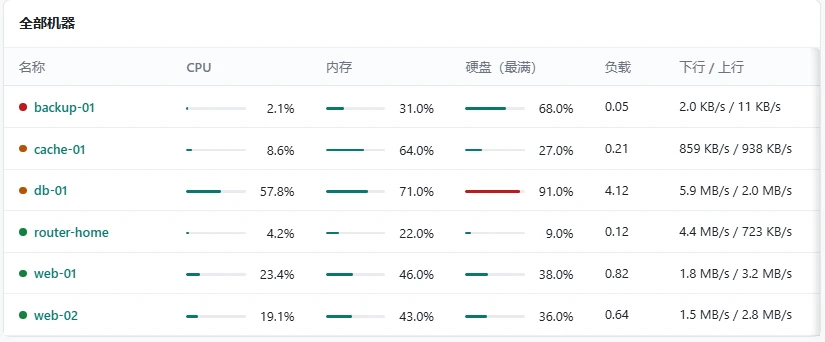
A cropped overview from the project documentation. The values illustrate the interface, not benchmark results.
Metrics need context. Systemd status applies to systems using systemd; OpenWrt does not have to expose the same service list. A WireGuard handshake timestamp is a diagnostic clue, not proof of a broken connection without considering traffic and configuration.
My priority is an actionable starting point for investigating abnormalities. Advanced monitoring rules, long-term analytics and full configuration orchestration can still live in tools designed for them.
One server and an agent on each machine
The server hosts the admin interface, machine records, metrics and operation history, with PostgreSQL for storage. Each managed Linux machine runs an agent that collects state, receives requests and decides whether to execute them.
The Vue 3 interface is built into the Go server binary. The agent is also written in Go, with Linux amd64 and arm64 releases. Check your device architecture: running OpenWrt does not automatically mean one of the published binaries will work.
The boundaries are easy to follow: a server, a database, and individual agents with their own configurations. Troubleshooting follows those boundaries too. Did the agent connect? Did it report data? Did the request arrive? Why was it accepted or refused?
For routers, start with the connection direction
Cloud servers and home routers often sit in different network conditions. A server may have a public address while a router is behind NAT. Exposing another inbound management service adds configuration and maintenance.
Fleetd agents initiate connections to the server. As long as a managed machine can reach the configured server address, it does not need a dedicated inbound agent-management port.
That suits Linux servers, OpenWrt and iStoreOS devices on different networks. The server still needs an address reachable by the agents, and production deployments need HTTPS and WebSocket forwarding as documented.
A newly connected machine is initially pending approval. The administrator compares the fingerprint shown by the installer with the dashboard before approving or rejecting it. Is this actually the machine I intended to add? A familiar hostname or an extra row in a table is not identity verification.
The next article will cover enrollment, fingerprints and reconnection in detail.
Visibility should not automatically grant control
Remote commands make permissions a practical concern. Some machines only need monitoring. Others need a few fixed maintenance actions. Only some need arbitrary commands and a full terminal.
Fleetd puts that choice in each agent’s local configuration:
| Permission | Allowed operations |
|---|---|
| monitor | Monitoring only; no remote command execution |
| allowlist | Locally predefined actions only |
| full | Arbitrary commands and the web terminal |
Commands are signed in the administrator’s browser. The agent verifies them with a trusted public key, then checks the target, validity period and local permissions. The server relays requests; a plain unsigned request is insufficient to make the agent execute it.
This reduces blind trust in server instructions, but the assumptions matter: the browser and the frontend code running inside it must remain trustworthy.
Because the server also serves the admin interface, a compromised server could replace the page loaded on a later visit. A non-extractable key does not stop malicious page code from attempting to invoke signing. Command signatures alone therefore do not justify a claim of complete safety after a server compromise.
I will examine that trust chain separately. For initial use, keep monitoring-only machines at monitor, prefer allowlist for fixed actions, and enable full only where a complete terminal is required.
Updates need their own trust mechanism
Manually copying a new agent binary to every machine becomes tedious. Automatically running any downloaded file leaves the authenticity problem unresolved.
Fleetd uses signed release bundles. The publisher signs them in their own environment, and agents validate them against a configured release public key. Command signing and release signing serve different purposes and should be managed separately.
GitHub release assets therefore have distinct roles. Ordinary agent binaries can be used for manual deployment on matching architectures. A signed .release bundle is useful only to agents that trust the corresponding release key.
Self-hosters should establish their own release keys and update process using the documentation. Uploading the author’s bundle does not make it valid for every independent installation. Version checks, validation failures and recovery during updates will get a dedicated article.
Try the server with Docker Compose
With Docker and the Compose plugin installed, try the server on your own computer:
git clone https://github.com/weiyi0/fleetd
cd fleetd
git checkout v0.3.0
docker compose up -d
docker compose run --rm fleetd admin-add admin
Set the administrator password when prompted, then open http://localhost:8480. The interface supports English and Chinese.
The checkout pins this walkthrough to v0.3.0. Compose builds the server from source and starts PostgreSQL, so the first run downloads dependencies and compiles software; duration depends on your computer and network.
At this point the dashboard is running, but no machines are enrolled. The Docker image does not also generate signed agent bundles for you.
Follow the quick-start guide to compile and manually run an agent for a first experiment. For long-term use, configure your release key, upload signed agent bundles and enroll machines using the dashboard’s installation flow.
The sample Compose configuration is intended for evaluation. It includes example database credentials, and port 8480 is not bound exclusively to loopback. Restrict network access during local evaluation. Before network use, follow the deployment guide to change credentials, configure HTTPS and back up the database and keys.
Start with a test machine that is easy to recover. Verify its fingerprint, inspect its state and try only the actions its permissions allow. Add more machines after that complete flow works.
Why the first public release is v0.3.0
Agents in the existing deployment had already reached 0.2.0. The update mechanism requires a newer target version, so the first public release continued that sequence.
A version number describes progression; maturity still comes from use and verification. Fleetd currently suits people maintaining a small fleet of Linux servers and routers who want control over their data and are willing to understand deployment and permissions.
The repository, binaries and documentation let people inspect the implementation before adopting it. A feature table alone is no reason to present Fleetd as a replacement for every established operations tool. Its initial job is to connect machine status, alerts and necessary maintenance while keeping clear permissions on every machine.
What comes next
This series will cover outbound connections and approval, browser signatures, local permissions, OpenWrt integration, alerting and updates. It will also revisit the process of developing the project with AI assistance.
I want to record concrete decisions: why a design was chosen, what it solved and what limitations it introduced. Actual problems and verification records will be added as development continues.
If you maintain servers or routers, start with the code and documentation. General questions can go into Issues; use GitHub’s private vulnerability-reporting channel for security findings.
I hope the tool reduces the switching involved in routine maintenance, and that these development notes provide reusable lessons for similar projects.
Discussion
Share a question or your experience. Comments appear after moderation. Your email is never displayed publicly. Comment privacy
Loading comments…